Introduction
A Girocode on an invoice is actually very practical. A suitable banking app automatically transfers all the data, saving you the hassle of entering your IBAN and other details.
With the help of PrintMulti and its capabilities, it is possible to
- extract the relevant data from the job currently being printed
- call a script that generates the QR code and
- embed it in the document when printing (including on PDF printers).
Two different methods are offered in the example provided to generate the QR code.
- Using a PowerShell script and the tool zint.
- With the help of a Python script and the “segno” module
All examples with hidden text offer the option of automatically embedding a Girocode in the generated ZUGFeRD invoice when printing to the ’XRechnung" printer.
Advantages, disadvantages and installation instructions (also for PrintMulti) can be found in the PrintMulti_XRechnung_en.pdf file. This file also explains in detail the steps required to activate the Girocode in the configuration file.
How it works
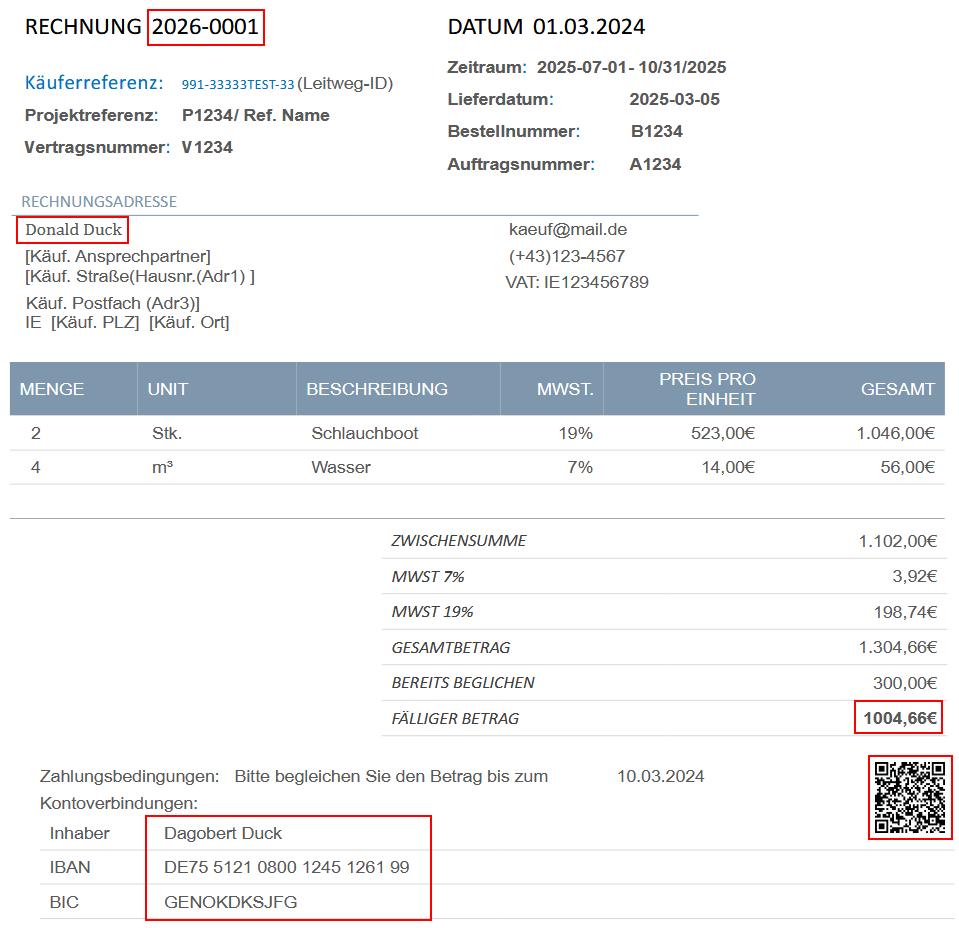
This is what it looks like in the end. In the example, however, the Girocode is located at the top right. This can be easily adjusted. The relevant texts are framed in red. In the example, the purpose of use is a combination of the invoice number and the recipient.
The following image shows the hidden text (using a macro or by changing the style sheet).
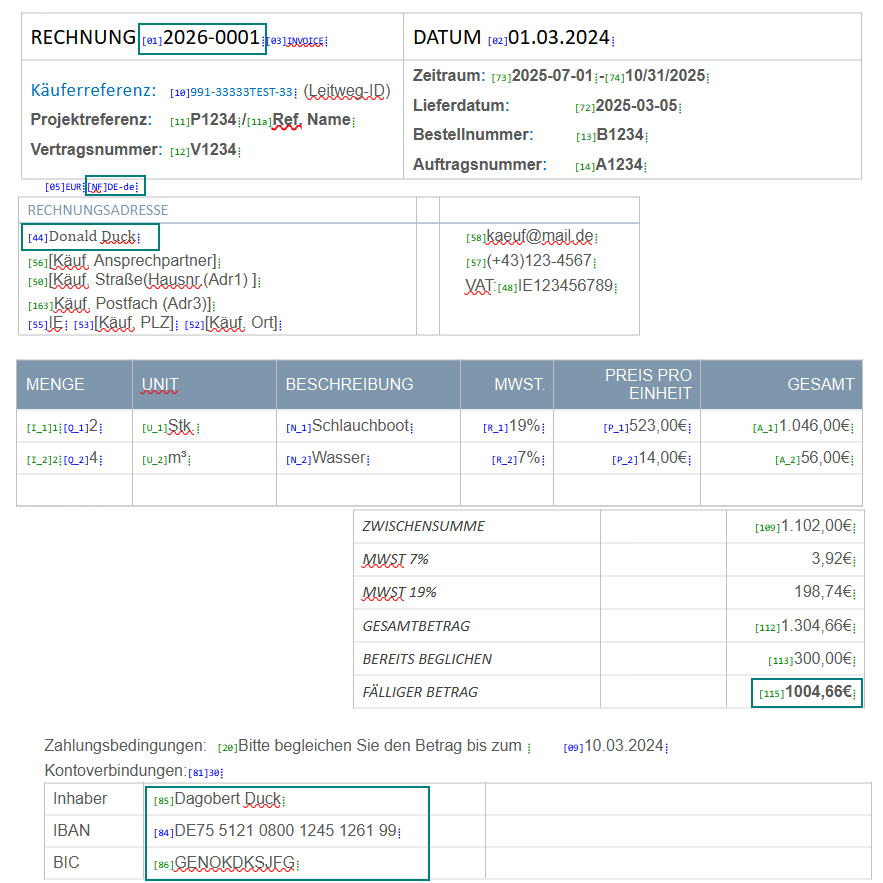
The following lines in PrintMultiRechnung.ini are responsible for the extraction:
invoicenr=$(;rawpage;\[01\]([^⁞]*)⁞;1;regex)
amount=$(;rawpage;"\\[115\\]([^⁞]*)⁞";1;regex)
buyer=$(;rawpage;\[44\]([^⁞]*)⁞;1;regex)
iban=$(;rawpage;\[84\]([^⁞]*)⁞;1;regex)
bic=$(;rawpage;"\\[86\\]([^⁞]*)⁞";1;regex)
nf=$(;rawpage;"\\[NF\\]([^⁞]*)⁞";1;regex)
currency=$(;rawpage;"\\[05\\]([^⁞]*)⁞";1;regex)
owner=$(;rawpage;"\\[85\\]([^⁞]*)⁞";1;regex)- ‘rawpage’ is the text content of the entire document. All recognised texts are used without separators in one line per page. An excerpt looks like this, for example:
INVOICE [01]2025-0001⁞⁞[03]INVOICE⁞DATUM [02]01.03.2024⁞Käuferreferenz:[10]991-33333TEST-33⁞ - The square brackets must be escaped with ‘\[’ and ‘\]’.
- The recognised text within the round brackets can be accessed via the index. There is only one pair of round brackets here, so only 1 can be used.
- The ‘⁞’ is simply a rare character from the Unicode character set that is used as a separator. This means that any number of characters except for the separator are assigned to the respective values on the left-hand side up to a separator.
- The value is accessed in the command line using @‘#(xxx)I’. If a variable begins with an ‘!’, it is set as an environment variable and can be accessed using %xxx%. This does not work with empty texts.
- For definitions between @‘...’, quotation marks are retained and escape sequences are not replaced.
- The PrintMulti log file ‘DbgLog.csv’ shows all extractions and script calls, if applicable.
Possible adjustments
The position of the Girocode must be adjusted to match the layout of your invoice. The corresponding values X, Y, Align and Height are self-explanatory and can be found in the [QRImage] section.
[QRImage]
Active=%CreateGiroCode%
Type=Image
Foreground=0
Source=%QRFile%
X=18cm
Y=1cm
Align=Left
Height=2cm
The intended use is specified here. In many cases, the invoice number is probably sufficient:
purpose="#(invoicenr)I,#(buyer)I"Selection of the procedure
You can choose between a Powershell script and a Python script in the ini file. Other scripting languages can be connected in the same way if necessary.
Activate the corresponding ExecuteCmd command by commenting out the unused commands.
ExecuteCmd= powerShell.exe -File @"%BasePath%\PrintMulti\Girocode\CreateGiroQRCode.ps1" -FileName @"%QRFile%" …
;ExecuteCmd="%PythonPath%" @"%BasePath%\PrintMulti\Girocode\CreateGiroQRCode.py" --filename @"%QRFile%" …
;ExecuteCmd=py @"%BasePath%\PrintMulti\Girocode\CreateGiroQRCode.py" --filename @"%QRFile%" …
Details on installation and pitfalls can be found here: PrintMulti_XRechnung_en.pdf
Girocode without ZUGFeRD invoice
The examples with hidden text supplied with the ZUGFeRD Composer allow easy embedding of a Girocode, as the necessary data can be extracted very easily.
This also works with other invoices, provided that the relevant data can be extracted. Normally, the account details are fixed, so only the purpose and the amount need to be extracted from the invoice.
In the example ‘invoice_two_vat_girocode_only.odt’, all hidden text has been removed. If you take a look at the extracted texts in the ‘C:\ZUGFeRD\Temp’ directory, you will see that the invoice number (=purpose of use) and the amount can be extracted.
The relevant sections are (spaces at the beginning and end are removed by the Girocode scripts)
...RECHNUNG: 2025-0001DATUM:...0,00€FÄLLIGER BETRAG1004,66€Zahlung...
There is also a ‘PrintMulti_Girocode.ini’ file, which is prepared accordingly. It requires a PrintMulti printer called ‘Girocode’..
The important section here is (‘purpose’, ‘amount’ from the invoice text; the rest is fixed)
purpose=$(;rawpage;RECHNUNG:([^DATUM])DATUM;1;regex)
amount=$(;rawpage;FÄLLIGER BETRAG"([^€])€;1;regex)
owner="Gustav Gansöäü"
iban="DE75 5121 0800 1245 1261 99"
bic="GENOKDKSJFG"
nf="DE-de"
currency="EUR"
The account holder may also include umlauts. However, the Girocode definition does not permit the use of all Unicode characters from the character set. The PDF invoice contains a different account holder.

