GnuCash and ZUGFeRD
🖖We connect worlds🤘
(formerly eInvoiceBridge)
GnuCash is a powerful, free accounting software. However, anyone who wants to create ZUGFeRD or other electronic invoices from GnuCash will quickly encounter limitations.
The issue is becoming increasingly urgent: legal requirements for electronic invoicing are being introduced gradually. GnuCash users are therefore increasingly faced with the question: How can compliant electronic invoices be created from existing accounting data without having to switch from their familiar accounting software?
I have been using GnuCash for many years as the treasurer of a club, and I would not want to be without it. However, I do not need its invoicing functions for this purpose. Nevertheless, I wanted to find a solution to this particular problem.
eInvoiceShuttle – the solution
This free command-line program (CLI) accesses GnuCash databases directly and retrieves the necessary information. It supports SQLite, PostgreSQL, and MariaDB/MySQL (no XML-stored data). eInvoiceShuttle then uses this data to generate electronic invoices in the formats listed—including automatic validation with the KoSIT Validator, if desired.
However, it is not quite as straightforward as it might initially sound. GnuCash does not readily allow all the information required for a standards-compliant electronic invoice to be entered.
- Difficulties may arise, particularly with addresses—such as international billing addresses. eInvoiceShuttle allows you to export all addresses to a CSV file. This makes it easier to verify the automatic recognition.
- Additional required information: For other information that is needed, definitions can be entered in the notes fields available for each customer and invoice.
- A configuration file is central to the setup. It contains the database connection settings, bank details and other options.
The software archive therefore includes not only the program but also a detailed manual and a document with numerous application examples. In this post, I’ll focus on the most important points and show what matters when creating electronic invoices from GnuCash.
But once set up correctly, eInvoiceShuttle offers many ways to significantly enhance GnuCash’s standard invoices.
Attention! eInvoiceShuttle is a new software program. Please carefully review all generated invoices before using them.
eInvoiceShuttle – The Architecture
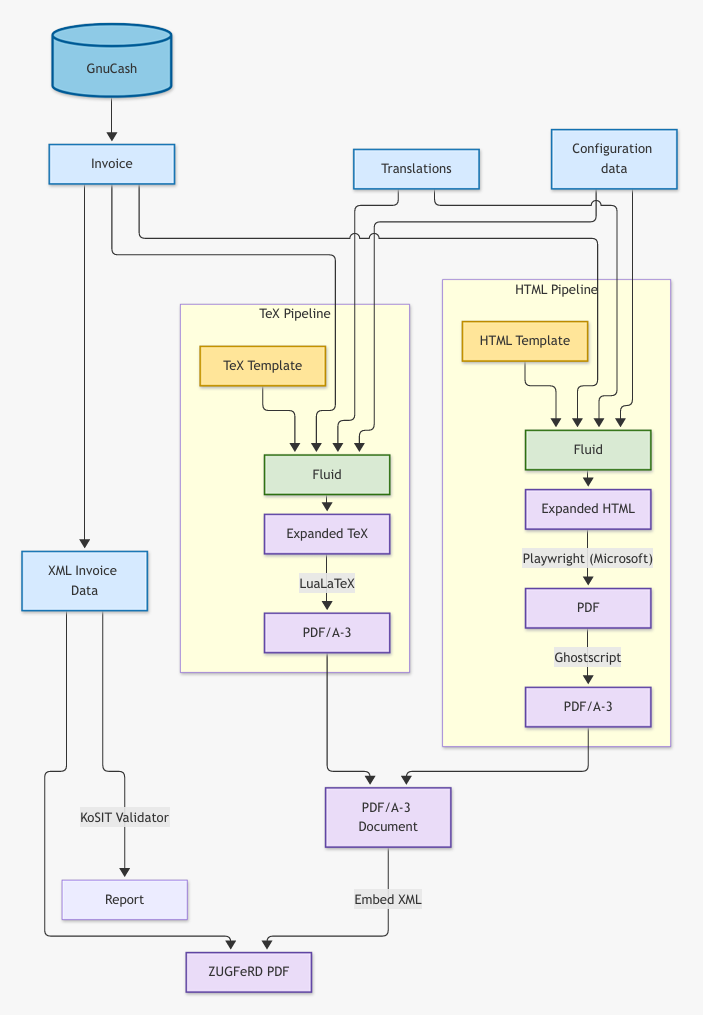
The structure differs fundamentally from the ZUGFeRD Composer. Instead of using pre-made invoice forms—such as those from Word or Excel—eInvoiceShuttle creates invoices from scratch using customizable templates.
The following overview illustrates the process from the GnuCash data to the finished electronic invoice.
Enhancements and limitations
Enhancements
Even aside from generating electronic invoices, eInvoiceShuttle offers numerous ways to enhance GnuCash invoices—if only through its easily customizable templates.
Here is an example of the HTML output, which can be used, for instance, for sending invoices by email.
But there is more...
- Customizable invoice templates: HTML and TeX, with Fluid/Liquid as a powerful template engine.
- Individual design: Logos, background images and multipage invoices in the TeX template.
- Multilingual support: 23 European languages and flexible rules for selecting the invoice language.
- International invoicing: Different currencies, delivery addresses, references and reverse charge.
- Automatic validation: Validation of generated invoices using the KoSIT Validator.
GnuCash provides a text field labeled Action for invoice line items. This can be used in four different ways (including combinations) with eInvoiceShuttle.
- As a unit: Invoice line items with quantities require a unit. Available units are defined in a configuration file.
- As an image: The TeX template can specify the name of an image to display alongside the invoice line item.
- As a link: A URL entered in this field is attached to the item's description.
- As additional text: This text appears as Detail on the invoice.
The My Favorites example, which includes a little promotion for a business I know, uses all these options except Unit, as there is not enough space for it. The following configuration in the Action field produces the result shown in the image below.
text:=Very good friends of ours;link:=https://www.optiksehenswert.de/startseite.html;image:=myfavorites/sehenswert.png
Warning! The standardized electronic invoice formats do not provide corresponding fields for these enhancements. They affect the visual presentation of the invoice, not the structured invoice data.
Limitations
- GnuCash supports three types of discounts. Only discounts applied to net amounts are supported.
- Since eInvoiceShuttle is being used with different GnuCash databases for the first time, additional peculiarities or previously unknown issues may arise. I would appreciate any feedback you may have.
The examples
Warning! GnuCash allows transactions and accounts to be organized in many different ways. The example database uses accounts for multiple currencies and tax-exempt transactions. These are example accounts that would probably not be used in quite this way in actual bookkeeping.
However, not all the following examples are entirely ordinary invoices. If you have not yet figured out my fondness for heavy metal and Ireland, you will certainly discover it here.
The best way to explore the examples is to start one of the two Spotify playlists featuring the songs referenced in the invoices and then take your time looking through the invoices.
Fans of Hitster will quickly notice that, in most cases, the invoice total corresponds to the year in which the respective song was released.
Quiz enthusiasts can try to identify the more than 30 bands hidden in the first song, "Metal Crüe", on the heavy metal playlist.
Heavy Metal Playlist
Irische Musik Playlist
For details about the options available in invoices, see the help file Examples_en.pdf. It also contains links to the examples provided.
Incidentally, all PDF invoices should be valid ZUGFeRD invoices. You can check this using online validators such as PortInvoice. PortInvoice is particularly helpful when digital invoices contain errors, as it provides considerably more information than standard validators.
The examples featuring billing addresses in different countries also take the applicable tax information into account. Depending on the circumstances, the EU transactions shown, for example to Finland, Austria and Sweden, use the codes AE (reverse charge) or K (tax-exempt intra-Community supply). The code G is used for the illustrated exports to non-EU countries.
Electronic invoices must contain the correct tax category code even when no VAT is charged.
| Country and link | Features demonstrated |
|---|---|
| Finland: finnisch / englisch | Reverse charge (EU cross-border transaction), discounts, references, order number from GnuCash, delivery address, paid invoice |
| Germany(1): deutsch/ englisch | Multiple VAT rates, discounts, multipage invoice, VAT code column, translated invoice line descriptions |
| Germany(2): englisch | Display of Details, credit note/cancellation with customized payment terms, translated invoice line descriptions |
| USA: englisch | Background image (AI-generated), currency: $ |
| Austria: deutsch / englisch | Translation of text within a single language variant (de-DE, de-AT) |
| Scotland englisch | Background image (Glencoe), regional language variant (en-GB-SCT), currency: £ |
| Sweden schwedisch / englisch | Background image (AI-generated), display of Details, reference |
| Ireland englisch | Background image (Cliffs of Moher), links to YouTube |
| England: englisch | Background image (AI-generated), currency: £, links to band websites, no logo |
| Worldwide englisch | Images in invoice line items, slightly larger font in the table |
| My Favorites deutsch / englisch | Background image (Ireland), details, images in invoice line items, links, multiple VAT rates, customized payment terms, gross prices |
Installation
A corresponding installation guide is available.
When installing MiKTeX, make sure that missing packages are installed automatically.
Once installation is complete and you have successfully run the example scripts, you can move on to your own GnuCash database.
- Save your GnuCash database as an SQLite database in an easily accessible directory.
- Enter the full file name—preferably using
/as the directory separator—into theappsettings.jsonfile in thebin\cli\configdirectory of the extracted eInvoiceShuttle archive. The relevant section is calledConnection. There you will also find the reference to the sample database. - Run the sample scripts again and check the results in the corresponding subdirectory of
C:\ProgramData\eInvoiceShuttle.Invoices. - Next, check the CSV file containing the exported addresses. It is generated by the script
RunAddressCheck.cmdand is also located atC:\ProgramData\eInvoiceShuttle.Invoices. Pay particular attention to the columns with uppercase headings.
Electronic invoices (ZUGFeRD, XRechnung, Factur-X) from GnuCash.
And finally, as a little bonus, here is the example invoice for the USA – one that might not please all Americans...